AI agents
What should an AI agent do without asking a person?
Why an agent needs a boundary that a chatbot doesn't
A chatbot answers questions. An agent writes into your systems: it books the slot, updates the customer record, sends the follow-up. We set out the difference in our guide to AI agents and chatbots. That changes what a mistake looks like. A chatbot gets something wrong and gives a bad answer. An agent gets something wrong and books the wrong appointment, or emails the wrong customer.
The OWASP security project has a name for an agent with too much room: excessive agency, where an AI system can be led into "damaging actions" by output that's unexpected, ambiguous or manipulated. It lists three root causes: excessive functionality (too many tools), excessive permissions (too much access) and excessive autonomy (too little checking). Drawing the boundary is how you decide how much of each the agent gets.
The jobs an agent can finish on its own
Look for jobs that pass these tests:
- The rule is already written down: your trading hours, your services, the open slots in your calendar.
- The customer asked for it in this conversation.
- If it goes wrong, you'll see it on the record and can put it right before any harm is done.
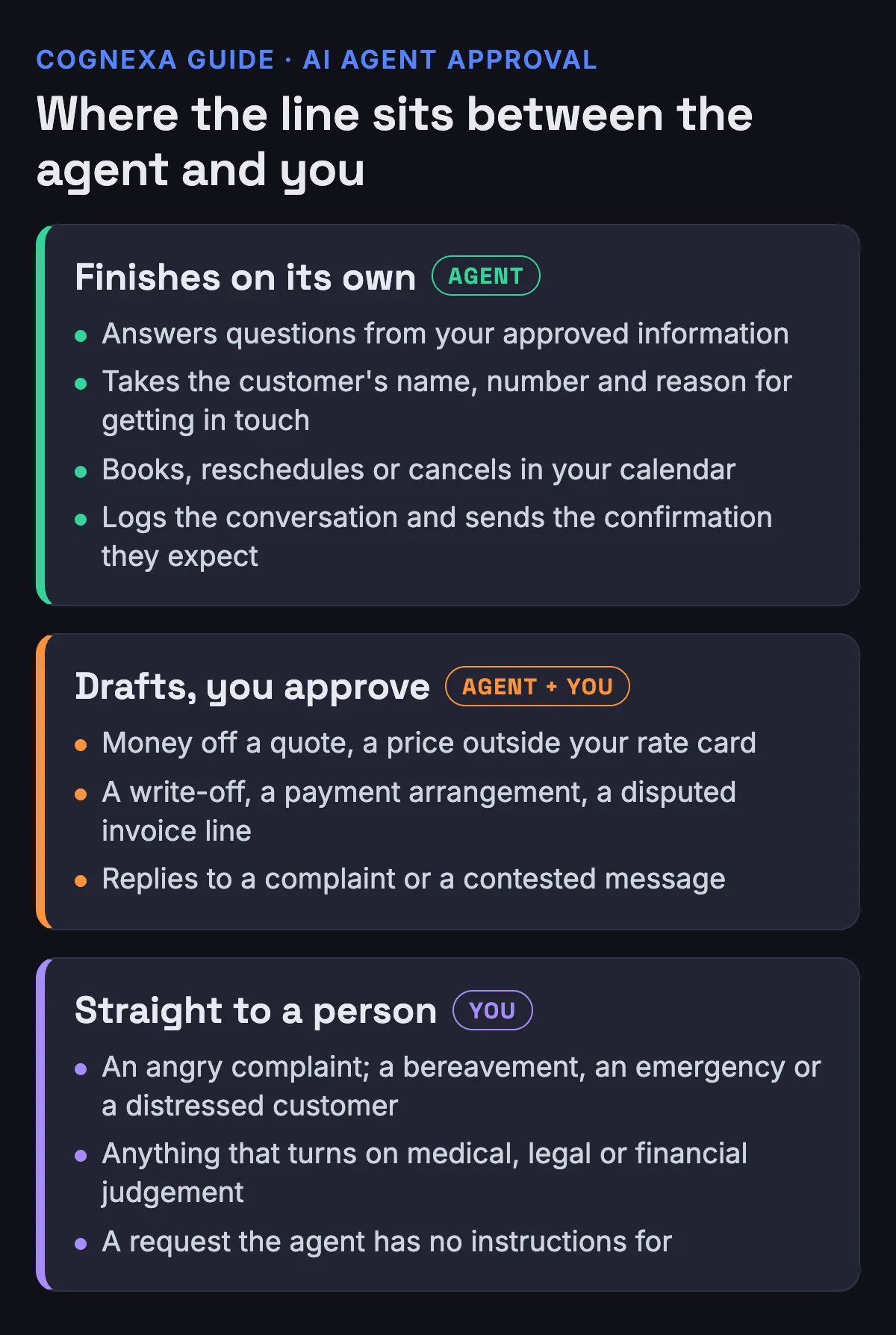
That covers answering questions from your approved information, taking a customer's name, number and reason for getting in touch, and booking, rescheduling or cancelling in your calendar. Our AI receptionist page lists those among the jobs a receptionist handles well. Logging the conversation on the customer record and sending the confirmation they're expecting belong here too.
Even inside those jobs, some calls are yours. Booking an open slot is routine. Deciding who gets the last emergency slot isn't, and our workflow automation page keeps emergency slots, deliberate overbooking and who gets priority with a person.
Anything involving money or a new promise: the agent drafts, you approve
Some actions are worth automating right up to the last click. The agent does the legwork, fills in the document or writes the reply, and a person reads it and presses send.
That's where anything touching money or a commitment you haven't made before belongs: money off a quote, a price outside your rate card, a write-off, a payment arrangement, a disputed line on an invoice. Replies to a complaint or a contested message go here as well. Those are the decisions our workflow page leaves with a human, and its inbox automation drafts a reply for a human to approve.
OWASP's guidance points the same way. Among its ways to prevent excessive agency is to "require a human to approve high-impact actions before they are taken", and among the fixes in its worked example, the user reviews and presses send on every email the assistant drafts.
Conversations that go straight to a person
Some conversations shouldn't sit in an approval queue at all. An angry complaint needs somebody who can apologise and decide on the spot. A bereavement, an emergency or a distressed customer needs a human voice. Anything that turns on medical, legal or financial judgement belongs with the professional, and so does any request where a wrong answer causes real harm. Each of those is on the hand-over list on our AI receptionist page. The agent runs on the same logic whichever channel it speaks through (our agent guide explains this), so it's worth applying the same list on WhatsApp and email.
A request the agent has no instructions for goes to a person too. Guessing is the failure you're trying to prevent. A hand-over with the details already taken is the fallback. Our guide to what an AI receptionist script should say covers how that hand-over sounds on a phone call.
Credit checks and other decisions about a person need a closer look
Some decisions reach further than a booking. POPIA's section on automated decision-making says a person may not be subject to a decision that has legal consequences for them, or affects them to a substantial degree, where it rests solely on automated processing meant to build a profile of them, such as their creditworthiness, reliability or conduct.
The section has exceptions. It doesn't apply to a decision taken in connection with a contract, where the person's request under that contract has been met or appropriate measures protect their legitimate interests, or to a decision governed by a law or code of conduct that specifies such measures. In the contract case, those measures have to give the person a chance to make representations about the decision, and enough information about the logic behind it to do so.
So an agent that decides by itself whether a customer qualifies for credit terms is the kind of build to take to your information officer or an attorney before it goes live. Cognexa builds so a person reviews any materially affecting decision, as our workflow page sets out.
Limit what it can reach, as well as what it's told
An instruction not to issue refunds is weaker protection than giving the agent no way to issue a refund. OWASP recommends keeping the tools an agent can call, what those tools can do and the permissions they carry to the minimum necessary. It also recommends enforcing authorisation in the systems the agent connects to, so the AI isn't the thing deciding whether an action is allowed.
In plain terms: an agent that only quotes from your price list gets read access to the price list. An agent that books gets your calendar, and no write access to your accounting package. Keep a log of what it does as well. Logging and monitoring won't prevent excessive agency, OWASP says, but they can limit the damage.
How to widen the boundary later
Start narrow. Our guide to how long AI automation takes to set up explains why.
After the agent goes live, the approval queue starts telling you things. If a kind of draft keeps going out without a word changed, it's a candidate to move across to "act alone". Move it, write the change down, and keep reading the log. If a kind of draft keeps coming back with corrections, it stays with a person, or the rule behind it needs writing more clearly.
How Cognexa draws the line with you
We scope the work before naming the technology, because what the agent is allowed to do matters far more than what it's called. Every action an agent can take without a human is agreed with you upfront, in writing, before it goes live, and every agent we build has explicit limits on what it may do without a human confirming. For quoting, invoicing, bookings, inbox triage and CRM updates, our workflow page sets out what the software does and what a person still decides.
Tell us which jobs eat your team's week, and we'll map which ones an agent can finish alone, which ones it drafts for you to approve, and which stay with your team. Map your automation with Cognexa.